For live streaming and content creation, my best overall pick is the 14-inch MacBook Pro with M5 Pro: its 48GB of memory and 1TB SSD give demanding editing and multitasking more room than the standard M5 model. The 14-inch M5 MacBook Pro is a strong fit for creators who want a newer system with 24GB of memory, while the 2021 16-inch M1 Pro offers a larger workspace and capable Apple silicon in an older generation. The main tradeoff is between buying newer hardware with more headroom and choosing an older or renewed MacBook Pro to save on capability you may not need. Screen size, memory, storage, and the condition of renewed models can matter as much as the chip for a streaming setup. Read on for my full breakdown of how these 10 options fit different creator needs.

Prime made for students and young adults
- Fast, free delivery for dorm and study essentials
- Prime Video and Amazon Music included
- Member-only deals
Key Takeaways
- The M5 Pro 14-inch is the strongest all-around creator choice in this lineup: 48GB of RAM and a 1TB SSD make it better equipped for simultaneous streaming, editing, and large project files than the standard M5 configuration.
- The standard M5 14-inch is the simpler new-generation pick, with 24GB of memory and 1TB of storage for creators who do not need the M5 Pro’s extra capacity.
- The 16-inch M1 Pro stands out for screen space and remains a more creator-oriented option than the older 13-inch Intel and 8GB renewed models.
- The M5 Max is a specialist choice, not a default recommendation: 128GB of RAM and 2TB of storage suit heavy production workloads, but many streamers will not use that much capacity.
- Several lower-spec and renewed 13-inch models come with meaningful limits: 8GB of memory and 256GB storage can constrain multitasking and project storage, while renewal condition and exact configurations merit careful checking.
| Apple MacBook Pro MPXV2LL/A Laptop (Renewed, Space Gray, 13.3-inch, 256GB SSD, 8GB RAM, Mac OS) | 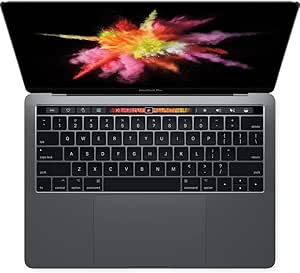 | Best Lightweight Entry for Basic Streaming | Processor: 3.1GHz dual-core Intel Core i5, Turbo Boost up to 3.5GHz | Memory: 8GB 2133MHz LPDDR3 | Storage: 256GB SSD | VIEW ON AMAZON | See Our Full Breakdown |
| Apple MacBook Pro 13-inch (Renewed) |  | Best Renewed Intel Pick for Multitasking | Processor: 8th-generation Intel Core i5, quad-core | Memory: 8GB | Storage: 256GB SSD | VIEW ON AMAZON | See Our Full Breakdown |
| Apple 2025 MacBook Pro Laptop with M5 Chip, 14.2-inch Liquid Retina XDR Display, 24GB Memory, 1TB SSD, Space Black |  | Best Overall for Most Streamers and Creators | Processor: Apple M5 with 10-core CPU and 10-core GPU | Memory: 24GB unified memory | Storage: 1TB SSD | VIEW ON AMAZON | See Our Full Breakdown |
| Apple MacBook Pro Laptop with M5 Pro Chip, 15-core CPU, 16-core GPU, 14.2-inch Liquid Retina XDR Display, 48GB RAM, 1TB SSD, Space Black |  | Best for Heavy Production Workloads | Processor: Apple M5 Pro with 15-core CPU and 16-core GPU | Memory: 48GB unified memory | Storage: 1TB SSD | VIEW ON AMAZON | See Our Full Breakdown |
| Apple 2021 MacBook Pro (16.2-inch, M1 Pro chip, 10-core CPU, 16-core GPU, 16GB RAM, 512GB SSD) – Space Gray |  | Best Large-Screen Editing Pick | Model: MacBook Pro (2021) | Processor: Apple M1 Pro, 10-core CPU | Graphics: 16-core GPU | VIEW ON AMAZON | See Our Full Breakdown |
| Apple 2020 MacBook Pro 13-inch with 2.3GHz Intel Core i7, 32GB RAM, 1TB SSD, Space Gray (Renewed) |  | Best Intel Pick for Memory-Heavy Workflows | Processor: 2.3GHz quad-core Intel Core i7, 10th generation | Memory: 32GB RAM | Storage: 1TB SSD | VIEW ON AMAZON | See Our Full Breakdown |
| Apple MacBook Pro 16.2-inch with M5 Max, 128GB RAM, 2TB SSD, Space Black |  | Best Premium Workstation for Heavy Production | Display: 16.2-inch Liquid Retina XDR | CPU: M5 Max, 18-core | GPU: 40-core | VIEW ON AMAZON | See Our Full Breakdown |
| Apple MacBook Pro with M2 Chip, 13-inch Retina Display, 8GB RAM, 512GB SSD, Touch Bar, Backlit Keyboard, FaceTime HD Camera, Space Gray |  | Best Portable Apple Silicon Starter | Display: 13-inch Retina LCD, 2560 x 1600 pixels | Processor: Apple M2, 8-core CPU | Graphics: Integrated Apple GPU, up to 10-core | VIEW ON AMAZON | See Our Full Breakdown |
| Apple 13-inch MacBook Pro (Mid 2020, Space Gray, 8GB RAM, 256GB SSD, Core i5) |  | Best Basic Renewed Mac for Simple Streams | Model year: Mid 2020 | Display: 13-inch | Processor: 1.4GHz Core i5 | VIEW ON AMAZON | See Our Full Breakdown |
| Apple MacBook Pro 13-inch with M1 Chip (Renewed, Space Gray, 8GB RAM, 256GB SSD) |  | Best Renewed Entry into Apple Silicon | Processor: Apple M1 | Graphics: 8-core GPU, shared graphics memory | Memory: 8GB RAM | VIEW ON AMAZON | See Our Full Breakdown |
| macbook pro for live streaming and content creation | Memory | Storage | Display | Processor |
|---|---|---|---|---|
| Apple MacBook Pro MPXV2LL/A La | 8GB 2133MHz LPDDR3 | 256GB SSD | 13.3-inch Retina, 2560 x 1600 | 3.1GHz dual-core Intel Core i5, Turbo Boost up to 3.5GHz |
| Apple MacBook Pro 13-inch | 8GB | 256GB SSD | 13-inch Retina with True Tone | 8th-generation Intel Core i5, quad-core |
| Apple 2025 MacBook Pro Laptop | 24GB unified memory | 1TB SSD | 14.2-inch Liquid Retina XDR | Apple M5 with 10-core CPU and 10-core GPU |
| Apple MacBook Pro Laptop with | 48GB unified memory | 1TB SSD | 14.2-inch Liquid Retina XDR | Apple M5 Pro with 15-core CPU and 16-core GPU |
| Apple 2021 MacBook Pro | 16GB | 512GB SSD | 16.2-inch Liquid Retina XDR | Apple M1 Pro, 10-core CPU |
| Apple 2020 MacBook Pro 13-inch | 32GB RAM | 1TB SSD | 13-inch Retina with True Tone | 2.3GHz quad-core Intel Core i7, 10th generation |
| Apple MacBook Pro 16.2-inch wi | 128GB unified memory | 2TB SSD | 16.2-inch Liquid Retina XDR | — |
| Apple MacBook Pro with M2 Chip | 8GB unified memory | 512GB SSD | 13-inch Retina LCD, 2560 x 1600 pixels | Apple M2, 8-core CPU |
| Apple 13-inch MacBook Pro | 8GB RAM | 256GB SSD | 13-inch | 1.4GHz Core i5 |
| Apple MacBook Pro 13-inch with | 8GB RAM | 256GB | 13.3-inch Retina, 2560 x 1600 pixels | Apple M1 |
More Details on Our Top Picks
Apple MacBook Pro MPXV2LL/A Laptop (Renewed, Space Gray, 13.3-inch, 256GB SSD, 8GB RAM, Mac OS)
This renewed 13.3-inch MacBook Pro is the most portable, low-demand option in this group, weighing just 2 pounds and offering a sharp Retina display for managing a stream, notes, and basic edits on the go. Its dual-core Intel Core i5 and 8GB of memory are a narrower fit than the quad-core processor in the Apple MacBook Pro 13-inch (Renewed), so I would reserve it for modest production rather than complex editing or multiple demanding apps at once. The 256GB SSD keeps everyday file access responsive, but recorded streams and video projects can fill it quickly. Compared with the M1 Pro 16-inch model, this is much less suited to sustained creative workloads; its appeal is portability and simpler streaming tasks, with older hardware and limited memory as clear compromises.
Pros:- Light 2-pound design is easier to carry between streaming locations
- 2560 x 1600 Retina display provides a detailed workspace
- SSD storage supports responsive everyday file access
- Intel Iris Plus Graphics 650 handles basic visual tasks
Cons:- Dual-core processor is a weaker fit for demanding editing and multitasking than the quad-core renewed 13-inch model
- 8GB memory limits headroom for streaming software alongside creative apps
- 256GB storage can fill quickly with video files and recordings
Best for: Mobile creators who mainly stream in a simple setup, handle light edits, and value a compact laptop over fast rendering.
Not ideal for: Creators editing high-resolution footage, running several production tools together, or keeping large recordings locally; the 8GB memory and 256GB SSD leave little headroom.
- Processor:3.1GHz dual-core Intel Core i5, Turbo Boost up to 3.5GHz
- Memory:8GB 2133MHz LPDDR3
- Storage:256GB SSD
- Display:13.3-inch Retina, 2560 x 1600
- Graphics:Intel Iris Plus Graphics 650
- Weight:2 pounds
- Battery:54.5-watt-hour lithium-ion
- Connectivity:USB, Wi-Fi 802.11ac, Bluetooth
Our verdict“Choose this renewed model for lightweight, mobile streaming and basic content work, not as a main machine for demanding video production.”
Apple MacBook Pro 13-inch (Renewed)
The strongest case for this renewed 13-inch model over the MPXV2LL/A is its 8th-generation quad-core Intel Core i5, which offers a better base for keeping streaming software and lighter editing tasks moving together. Its 13-inch Retina screen with True Tone is useful for long editing sessions, while Touch ID adds convenient access between work tasks. Still, the 8GB RAM and 256GB SSD place a firm ceiling on how much production work I would assign to it. It is a more capable Intel choice than the dual-core MPXV2LL/A, but it cannot match the newer M5 MacBook Pro’s memory, storage, or current-generation hardware. I would pick it for modest workloads and familiar Intel software needs, while treating its renewed condition and potentially limited warranty as part of the tradeoff.
Pros:- Quad-core Intel Core i5 is better suited to multitasking than the dual-core MPXV2LL/A
- True Tone Retina display adapts its color temperature to ambient light
- Touch ID makes account access and routine authentication convenient
- 256GB SSD provides responsive storage for apps and active files
Cons:- 8GB RAM limits simultaneous streaming and editing workloads
- 256GB storage leaves little room for a large video library
- Renewed condition may come with a limited warranty
Best for: Budget-conscious creators who need a renewed Intel Mac for basic livestream control, light editing, and everyday content tasks.
Not ideal for: Video professionals who need ample memory, extensive local project storage, or a current-generation platform for sustained production workloads.
- Processor:8th-generation Intel Core i5, quad-core
- Memory:8GB
- Storage:256GB SSD
- Display:13-inch Retina with True Tone
- Graphics:Intel Iris Plus Graphics 645
- Color:Space Gray
- Condition:Renewed
- Touch features:Touch Bar and Touch ID
Our verdict“Pick this renewed 13-inch model if you want a more capable Intel multitasking option than the MPXV2LL/A for lighter creator work.”
Apple 2025 MacBook Pro Laptop with M5 Chip, 14.2-inch Liquid Retina XDR Display, 24GB Memory, 1TB SSD, Space Black
This M5 MacBook Pro is the most balanced pick here for creators who want one laptop to run a stream, edit footage, and manage a growing project library. Its 24GB unified memory gives more room for production apps than either renewed 13-inch Intel model, while the 1TB SSD is a meaningful step up from their 256GB drives. The 14.2-inch Liquid Retina XDR screen offers a larger, high-contrast workspace than those compact models, and the 12MP Center Stage camera is a useful built-in option for on-camera sessions. Compared with the M5 Pro configuration, this standard M5 model has less CPU and GPU capacity and half the listed memory, making it the more restrained choice for intensive workflows. For most solo creators, that tradeoff keeps the setup capable without stepping up to the higher-spec machine.
Pros:- M5 10-core CPU and GPU support demanding creator tasks
- 24GB unified memory offers more multitasking room than the renewed Intel models
- 1TB SSD provides more working space than the 256GB and 512GB options here
- 14.2-inch Liquid Retina XDR display and 12MP Center Stage camera suit creator workflows
Cons:- Less CPU, GPU, and memory headroom than the M5 Pro model
- The listed port set may still call for adapters in some studio setups
- 14.2-inch screen is smaller than the 16.2-inch M1 Pro model for timeline-heavy editing
Best for: Solo streamers and video creators who want a current MacBook Pro with enough memory and storage for regular production without opting for the M5 Pro configuration.
Not ideal for: Editors with especially heavy multicamera or graphics-intensive projects who would benefit from the M5 Pro’s 15-core CPU, 16-core GPU, and 48GB memory.
- Processor:Apple M5 with 10-core CPU and 10-core GPU
- Memory:24GB unified memory
- Storage:1TB SSD
- Display:14.2-inch Liquid Retina XDR
- Ports:Three Thunderbolt 4, MagSafe 3, SDXC card slot, HDMI, headphone jack
- Camera:12MP Center Stage
- Audio:Six speakers with Spatial Audio and Dolby Atmos
- Color:Space Black
Our verdict“Choose the M5 model as the all-around creator laptop if you want modern performance, 24GB memory, and 1TB storage without stepping up to M5 Pro.”
Apple MacBook Pro Laptop with M5 Pro Chip, 15-core CPU, 16-core GPU, 14.2-inch Liquid Retina XDR Display, 48GB RAM, 1TB SSD, Space Black
For streamers who edit while producing, work with large creative projects, or keep many apps open, this configuration brings the most headroom among the 14.2-inch models here. The M5 Pro 15-core CPU and 16-core GPU pair with 48GB unified memory, giving it a clear workload advantage over the standard M5 MacBook Pro’s 24GB memory and 10-core chip. Its 1TB SSD and SDXC slot also make it more convenient to manage active footage than the 256GB renewed models. The tradeoff is that this much capability may be unnecessary for straightforward single-camera streams and light editing. It also remains a 14.2-inch laptop, so editors who want a larger built-in canvas may prefer the 16.2-inch M1 Pro MacBook Pro, even though that older model has less memory and an earlier chip.
Pros:- M5 Pro 15-core CPU and 16-core GPU target demanding creative workflows
- 48GB unified memory offers twice the listed capacity of the standard M5 model
- 1TB SSD and SDXC slot support active video workflows
- Thunderbolt 5, HDMI, and MagSafe 3 provide several useful connection options
Cons:- Its performance headroom is excessive for basic streaming and light editing
- 14.2-inch display gives less built-in workspace than the 16.2-inch M1 Pro model
- The 1TB SSD may still require external storage for extensive video archives
Best for: Professional creators who livestream while editing, manage large projects, or need substantial memory for several demanding apps at once.
Not ideal for: Casual streamers and creators with simple editing needs who would not use the M5 Pro’s extra CPU, GPU, and memory headroom.
- Processor:Apple M5 Pro with 15-core CPU and 16-core GPU
- Memory:48GB unified memory
- Storage:1TB SSD
- Display:14.2-inch Liquid Retina XDR
- Ports:Three Thunderbolt 5, MagSafe 3, SDXC, HDMI, headphone jack
- Connectivity:Wi-Fi 7, Bluetooth 6
- Camera:12MP Center Stage
- Speakers:Six speakers with Spatial Audio and Dolby Atmos
Our verdict“Choose this M5 Pro configuration when heavy multitasking and production performance matter more than keeping the setup simple.”
Apple 2021 MacBook Pro (16.2-inch, M1 Pro chip, 10-core CPU, 16-core GPU, 16GB RAM, 512GB SSD) – Space Gray
The 16.2-inch M1 Pro MacBook Pro makes the most sense when a large built-in editing canvas matters more than owning the newest chip. Its Liquid Retina XDR display gives timelines, preview windows, and control panels more room than the 14.2-inch M5 and M5 Pro models, while the 10-core CPU and 16-core GPU provide a solid basis for serious creative work. The listed up to 21 hours of battery life also suits creators who work away from a desk. Against the M5 model, this laptop offers a bigger screen but less memory and storage; against the M5 Pro model, it gives up newer processing hardware and 48GB RAM. Its 16GB memory and 512GB SSD are the practical limits to weigh before choosing it for larger projects.
Pros:- 16.2-inch Liquid Retina XDR display gives editing timelines more space than the 14.2-inch models
- M1 Pro 10-core CPU and 16-core GPU support demanding creative work
- Up to 21 hours of listed battery life suits mobile production
- Six-speaker system with force-cancelling woofers supports video and audio playback
Cons:- 16GB RAM is substantially less than the M5 Pro model’s 48GB
- 512GB SSD offers less working space than the 1TB M5 configurations
- Older M1 Pro generation lacks the newer chip platform in the M5 models
Best for: Video editors and streamers who prefer a roomy built-in screen for timelines and controls and want a capable Mac for mobile production.
Not ideal for: Creators who need 48GB memory, 1TB of internal storage, or the newer performance and connectivity listed for the M5 Pro model.
- Model:MacBook Pro (2021)
- Processor:Apple M1 Pro, 10-core CPU
- Graphics:16-core GPU
- Memory:16GB
- Storage:512GB SSD
- Display:16.2-inch Liquid Retina XDR
- Battery life:Up to 21 hours
- Camera:1080p FaceTime HD
Our verdict“Choose this 16-inch M1 Pro model if screen space and mobile editing matter more to you than newer hardware and larger memory capacity.”
Apple 2020 MacBook Pro 13-inch with 2.3GHz Intel Core i7, 32GB RAM, 1TB SSD, Space Gray (Renewed)
For livestreamers who keep editing software, browser tabs, and production tools open together, the 32GB of RAM is the main reason to choose this renewed Intel model. Its 1TB SSD also leaves more room for recordings and project files than the 256GB options here. Compared with the 13-inch M2 MacBook Pro, this MacBook has four times the listed memory and twice the storage, but its older Intel platform and integrated Iris Plus graphics make it a less compelling choice for graphics-heavy editing. The 13-inch Retina display is useful for mobile work, though it gives less room for timelines and stream controls than the 16.2-inch M5 Max model. I’d choose it for memory capacity and local storage, not for long-term platform headroom; it is renewed, and the listing’s one-year limited warranty should be checked before buying.
Pros:- 32GB RAM gives demanding multitasking more room than the 8GB models in this group.
- 1TB SSD provides ample space for recordings and active content projects.
- 13-inch Retina display with True Tone offers a sharp, compact workspace.
- Quad-core 10th-generation Intel Core i7 is suited to general production and editing tasks.
Cons:- Integrated Intel Iris Plus graphics are less capable for GPU-heavy creative workloads than the M5 Max model’s dedicated core count.
- Renewed condition means buyers should verify the device condition and warranty terms.
- The 13-inch screen can feel cramped when monitoring a stream while editing.
Best for: Streamers who need 32GB of memory and 1TB of local workspace for multitasking, editing, and saving recordings on a compact Intel Mac.
Not ideal for: Creators doing frequent GPU-intensive editing or wanting a newer Apple silicon platform; the integrated graphics and older Intel chip are less suited to those workloads.
- Processor:2.3GHz quad-core Intel Core i7, 10th generation
- Memory:32GB RAM
- Storage:1TB SSD
- Display:13-inch Retina with True Tone
- Graphics:Intel Iris Plus
- Ports:USB-C
- Warranty:1-year limited
Our verdict“Choose this renewed Intel MacBook if you prioritize 32GB RAM and 1TB of storage over newer silicon and stronger graphics.”
Apple MacBook Pro 16.2-inch with M5 Max, 128GB RAM, 2TB SSD, Space Black
This is the lineup’s strongest fit for creators building complex livestream and post-production workflows around one laptop. The 18-core M5 Max CPU, 40-core GPU, and 128GB unified memory provide substantial capacity for demanding editing, effects, and multitasking, while the 2TB SSD gives recordings and large project files more room than the 1TB Intel i7 option. Its 16.2-inch Liquid Retina XDR display also offers more working space for a timeline and stream controls than the 13-inch models. Connectivity is a practical advantage: HDMI, SDXC, MagSafe 3, and three Thunderbolt 5 ports can reduce reliance on adapters. The tradeoff is size and weight, plus the high-end specification may be unnecessary for simple streaming. Compared with the more portable M2 13-inch MacBook Pro, this is built for heavier workloads, not casual mobile sessions.
Pros:- M5 Max 18-core CPU and 40-core GPU target demanding creative workloads.
- 128GB unified memory supports extensive multitasking and large projects.
- 2TB SSD offers substantial space for recordings and media libraries.
- Large XDR display and HDMI, SDXC, and Thunderbolt 5 connections suit a production setup.
Cons:- 16.2-inch chassis is less convenient to carry than the 13-inch models.
- Its high-end processing and memory capacity may exceed the needs of routine streaming and basic edits.
- The listed configuration tops out at 128GB memory.
Best for: Professional streamers and video creators who edit high-resolution footage, use demanding effects, and need a large built-in display and broad port selection.
Not ideal for: Casual streamers, frequent travelers who prioritize a light laptop, or creators whose workloads do not need high memory and GPU capacity.
- Display:16.2-inch Liquid Retina XDR
- CPU:M5 Max, 18-core
- GPU:40-core
- Memory:128GB unified memory
- Storage:2TB SSD
- Ports:Three Thunderbolt 5, MagSafe 3, SDXC, HDMI, headphone jack
- Wireless:Wi-Fi 7, Bluetooth 6
- Battery life:Described as all-day
Our verdict“Pick the M5 Max when your production workload needs workstation-level capacity and you can accept a larger, less portable laptop.”
Apple MacBook Pro with M2 Chip, 13-inch Retina Display, 8GB RAM, 512GB SSD, Touch Bar, Backlit Keyboard, FaceTime HD Camera, Space Gray
The M2 chip and up to 20 hours of listed battery life make this a portable option for creators who stream or edit away from a desk. Its 512GB SSD gives more working space than the 256GB M1 and Core i5 listings, while the 13-inch Retina display keeps the laptop compact. That makes it a better everyday carry than the 16.2-inch M5 Max, but its 8GB of unified memory is a real ceiling if you run a stream, browser sources, and editing apps at once. The FaceTime HD camera can handle basic calls, though creators seeking a polished on-camera image will likely want an external camera. I’d place it ahead of the older Core i5 option for a portable Apple silicon workflow, but behind the 32GB Intel i7 when memory-heavy multitasking matters. The listed warranty is limited to 90 days.
Pros:- M2 chip provides an Apple silicon platform for everyday creative tasks.
- 512GB SSD offers more local project space than the 256GB models listed here.
- Up to 20 hours of stated battery life supports mobile use.
- 13-inch Retina display and three-pound listed weight make it easy to carry.
Cons:- 8GB unified memory can constrain intensive streaming and editing multitasking.
- Two Thunderbolt 3 ports limit direct connection options for production gear.
- Listed warranty is limited to 90 days.
Best for: Mobile creators who want an Apple silicon MacBook for light-to-moderate streaming, basic edits, and everyday content work with more than 256GB of storage.
Not ideal for: Creators who run complex live scenes alongside demanding editing apps, or buyers who need extensive ports and a longer listed warranty.
- Display:13-inch Retina LCD, 2560 x 1600 pixels
- Processor:Apple M2, 8-core CPU
- Graphics:Integrated Apple GPU, up to 10-core
- Memory:8GB unified memory
- Storage:512GB SSD
- Battery life:Up to 20 hours
- Weight:3 pounds
- Connectivity:Wi-Fi 6, Bluetooth, two Thunderbolt 3 ports
- Webcam:FaceTime HD
Our verdict“Choose this M2 model for portable everyday creation and a 512GB workspace, but not for memory-intensive live production.”
Apple 13-inch MacBook Pro (Mid 2020, Space Gray, 8GB RAM, 256GB SSD, Core i5)
This renewed 2020 MacBook Pro is the bare-bones choice here for straightforward streaming tasks: its 1.4GHz Core i5, 8GB RAM, and 256GB SSD can suit basic recording, calls, and light content work, but leave little room for demanding scenes or a growing media library. The listing says it has been professionally inspected and has battery capacity above 80%, useful details when considering a renewed laptop. Compared with the M1 MacBook Pro, this Intel model has less compelling listed performance and battery-life information; compared with the 32GB Core i7 version, it also has far less memory and storage for simultaneous apps and projects. Its main case is access to a compact MacBook Pro for modest tasks, rather than headroom for serious editing. The renewed condition, generic packaging, and potentially non-original accessories add uncertainty.
Pros:- Professionally inspected and tested, according to the listing.
- Battery capacity is stated to exceed 80%.
- Compact 13-inch format is convenient for a simple mobile setup.
Cons:- 8GB RAM and 256GB SSD limit multitasking and space for recordings.
- Older 1.4GHz Core i5 configuration offers less listed capacity than the M1 and M2 options.
- Renewed unit may arrive in generic packaging with non-original accessories.
Best for: First-time or occasional creators who need a renewed MacBook Pro for calls, simple livestreams, and light editing rather than complex production.
Not ideal for: Creators running multiple capture sources, effects, or large editing projects; 8GB RAM and 256GB storage offer limited room for that workload.
- Model year:Mid 2020
- Display:13-inch
- Processor:1.4GHz Core i5
- Memory:8GB RAM
- Storage:256GB SSD
- Condition:Renewed
- Battery condition:Capacity stated to exceed 80%
- Color:Space Gray
Our verdict“Consider this renewed Core i5 only for basic streaming and light editing when its limited memory and storage fit your workload.”
Apple MacBook Pro 13-inch with M1 Chip (Renewed, Space Gray, 8GB RAM, 256GB SSD)
The M1 gives this renewed 13-inch model a stronger foundation for everyday creative work than the older Core i5 MacBook Pro, while its up to 20 hours of stated battery life supports sessions away from an outlet. The 8-core CPU and GPU can handle general content tasks, and the 256GB SSD is enough for a small project set if recordings are moved to external storage. Against the M2 13-inch model, this configuration keeps the same 8GB memory and 256GB storage but offers an older chip and less built-in capacity than that model’s 512GB drive. Neither is a great match for heavy multitasking, and the M5 Max is in a different class for demanding production. Renewed condition can vary, so this pick makes most sense when portability and basic Apple silicon capability matter more than storage headroom.
Pros:- M1 8-core CPU and GPU provide capable performance for everyday creative tasks.
- Up to 20 hours of stated battery life suits mobile use.
- 13.3-inch Retina display with 2560 x 1600 resolution offers a sharp portable workspace.
- Three-pound listed weight keeps the laptop relatively portable.
Cons:- 8GB RAM limits headroom for heavier live production and multitasking.
- 256GB SSD fills quickly with video recordings and project files.
- Renewed condition may vary, and the listing does not specify a warranty duration.
Best for: Budget-conscious mobile creators who want an Apple silicon Mac for basic streaming and light editing, and who can store larger recordings externally.
Not ideal for: Creators who keep extensive video libraries on their laptop or run demanding stream and editing workloads at the same time.
- Processor:Apple M1
- Graphics:8-core GPU, shared graphics memory
- Memory:8GB RAM
- Storage:256GB
- Display:13.3-inch Retina, 2560 x 1600 pixels
- Battery life:Up to 20 hours
- Weight:3 pounds
- Connectivity:Wireless, Bluetooth, Wi-Fi 802.11a/b
- Operating system:macOS
Our verdict“Choose this renewed M1 MacBook for portable, light creative work if you can manage its 256GB storage and 8GB memory limits.”

How We Picked
I ranked these MacBook Pros for the work that shapes a creator’s day: running streaming software alongside a browser and chat, editing recorded footage, handling media libraries, and connecting a practical desk setup. I gave more weight to memory and storage capacity, chip generation, screen workspace, and the balance between performance and likely workload than to model age or headline specifications alone. A larger display can make timelines and monitoring easier, while more memory helps reduce pressure when several demanding apps are open. I also treated renewed status and older Intel hardware as tradeoffs that buyers should weigh against their needs.
The ranking favors configurations that provide useful headroom without making extreme capacity the only measure of quality. The M5 Pro leads because its 48GB of RAM and 1TB SSD make it the most balanced high-workload option here; the standard M5 follows as a capable newer choice with less headroom. The M1 Pro 16-inch comes next for buyers who value a bigger workspace and Apple silicon. The M5 Max ranks as the best specialist system, but below the balanced picks for most creators because its unusually high capacity may go unused. Older 13-inch and renewed models rank lower where limited memory, storage, or platform age can restrict demanding streaming and editing workflows.
Factors to Consider When Choosing Macbook Pro For Live Streaming And Content Creation
Choosing a MacBook Pro for streaming is less about chasing the newest chip and more about matching the machine to your actual workflow. I would start with how many apps and sources you run at once, how much footage you keep locally, and whether the laptop is also your editing workstation. These broader choices can prevent paying for capacity you will not use—or buying a configuration that becomes a bottleneck once your channel grows.
Match Memory to the Whole Streaming Session
Think about the full session, not just the streaming app: a typical creator may also have a browser, chat, audio controls, graphics, and editing tools open. More memory gives those tasks room to coexist, which is why the 48GB M5 Pro and 128GB M5 Max are better suited to heavier multitasking than the 8GB models. A lighter setup with one stream source and modest editing needs may not benefit from extreme memory capacity. A common mistake is buying based on the chip name alone while overlooking RAM. If you routinely keep many apps open or edit high-resolution footage while streaming, prioritize memory headroom; if not, spend that budget on storage, accessories, or a reliable capture setup.
Plan Storage Around Footage, Not Just Apps
Recorded streams and source footage can fill a drive faster than software, especially when you save multiple takes or work with high-bitrate files. The 1TB M5 and M5 Pro configurations offer more built-in workspace than the 256GB options, while the M5 Max’s 2TB is aimed at larger local libraries. External drives can extend capacity, but they add cables and another part of the workflow to manage. Avoid treating a small SSD as harmless just because you can archive files later; moving active projects can interrupt editing and post-stream routines. Decide whether you want a tidy, self-contained laptop setup or are comfortable building storage around external devices.
Choose Screen Size for Your Setup
A larger screen gives timelines, preview windows, and stream controls more room without constant window switching. That makes the 16-inch M1 Pro attractive for creators who edit on the laptop itself, while a 14-inch model can be easier to fit into a compact streaming desk or carry between locations. Screen size does not replace an external monitor, but it affects how usable the laptop is when traveling or working away from a full setup. Consider where your camera, microphone, and monitor will sit before choosing a display size. Buyers who mostly dock the laptop may value performance and ports more than the built-in screen area.
Treat Renewed and Older Models as a Condition-and-Workflow Decision
Renewed listings can make a MacBook Pro accessible, but the word renewed does not tell you the battery’s condition, included accessories, or the exact configuration. Check the seller’s condition details, return terms, and model specifications before comparing it with a newer system. Older Intel models may suit basic streaming or familiar legacy workflows, but they are less compelling when your routine depends on sustained editing and several apps running together. Older Apple silicon models such as the M1 options can still be useful, yet 8GB memory and 256GB storage narrow their room for growth. Choose an older or renewed machine when its verified condition and workload fit are clear, not simply because it carries the MacBook Pro name.
Spend for the Workload You Can Name
The M5 Max’s 128GB of RAM and 2TB SSD make sense for demanding production work, large media libraries, and heavy simultaneous workloads; they are hard to justify for a basic single-camera stream. The M5 Pro offers a more balanced step up for creators who edit and stream regularly, while the standard M5 has a stronger case for a less intensive routine. Write down the tasks that currently slow you down and the ones you expect to add soon. That helps separate useful headroom from specifications that will sit idle. Paying more is most defensible when it removes a recurring workflow limit, rather than when it merely makes the configuration look future-proof.
Check the Rest of the Streaming Chain
A capable laptop cannot compensate for a weak internet connection, poor audio, or an incompatible capture device. Before choosing a MacBook Pro, list the camera, microphone, interface, capture hardware, and external displays you plan to connect, then check each device’s requirements and connection options. This step can reveal that a hub or external monitor matters more to your desk than jumping to a higher chip tier. It also helps you budget for storage and backup, which are easy to overlook when comparing laptops alone. For creators who stream and record simultaneously, leave time to test the full setup with the actual software and sources you intend to use.
Frequently Asked Questions
Is the M5 Pro worth choosing over the standard M5 for streaming and editing?
I would choose the M5 Pro when streaming is paired with regular editing, many open apps, or larger media projects: its 48GB of memory gives more room than the standard M5’s 24GB. The standard M5 remains a sensible fit for creators with a lighter setup who want a newer model and 1TB of storage. The difference matters most when several demanding tasks happen at once, not simply because one chip name sounds more advanced. If your stream is simple and you edit occasionally, the standard model may be enough. If your workflow regularly pushes memory or editing capacity, the M5 Pro is the safer pick in this comparison.
Can an 8GB MacBook Pro handle a live stream?
An 8GB model may handle a modest stream, especially when the setup uses few sources and keeps other apps closed. The limitation appears when chat, browser tabs, audio tools, graphics, and editing software all need to run alongside streaming. That leaves less room for multitasking than the 24GB M5 or 48GB M5 Pro configurations. I would treat 8GB models as entry-level choices for basic, carefully managed workflows rather than flexible creator workstations. If you expect to edit footage regularly or expand your setup, more memory is a more useful long-term priority.
Should I choose the 16-inch M1 Pro or a newer 14-inch MacBook Pro?
Choose the 16-inch M1 Pro if a larger built-in display is central to your editing workflow and its 16GB memory and 512GB SSD fit your projects. The newer 14-inch M5 and M5 Pro models offer newer-generation hardware and more memory or storage in the listed configurations, which can better suit a workflow built around heavier multitasking. The 16-inch screen can make timeline work and monitoring more comfortable when you are away from an external display. A docked setup may reduce that advantage. Compare the actual screen preference against the extra headroom of the newer configurations rather than treating model year as the only deciding factor.
Is the M5 Max excessive for a solo streamer?
For many solo streamers, the M5 Max’s 128GB of RAM and 2TB SSD exceed what a straightforward streaming setup needs. Its capacity makes more sense when the laptop also supports demanding production work, large local footage libraries, or several intensive tasks at once. The M5 Pro is a more balanced choice in this lineup for creators who want strong multitasking without going to the highest-capacity configuration. Consider whether your current projects actually strain memory or storage before choosing the Max. If they do not, the additional capacity may bring little practical benefit to your day-to-day stream.
What should I verify before buying a renewed MacBook Pro for content creation?
Confirm the exact chip, memory, storage, screen size, and model year, since similar listing names can refer to very different configurations. Read the seller’s description for battery condition, cosmetic state, included power adapter, and return coverage. For creator use, pay close attention to whether the machine has 8GB or 32GB of memory and 256GB or 1TB of storage; those differences affect multitasking and project handling. Also check that your streaming software and peripherals support the model and operating system you plan to use. A renewed laptop can fit a basic workflow, but unclear condition or limited specifications can make it a poor match for demanding production.
Conclusion
For most creators in this lineup, I recommend the 14-inch M5 Pro as the best overall because its 48GB of memory and 1TB SSD balance demanding work with practical capacity. The standard 14-inch M5 is my best value in capability for buyers who want a newer system but do not need the Pro configuration’s extra headroom. For a best premium pick, choose the M5 Max only if your production workload can use its 128GB of RAM and 2TB SSD. The best choice for beginners is a carefully verified MacBook Pro that fits a simple stream; among newer options, the standard M5 offers more room to grow than the 8GB models. For a specific need—more laptop screen space, the 16-inch M1 Pro is the lineup’s standout, while older renewed 13-inch models make more sense for basic tasks than demanding editing. Match memory, storage, display size, and condition to your real workflow, and the right choice becomes clearer.
Black Friday Picks

Sony WH-1000XM6 Wireless Noise-Canceling Headphones, Black
As an affiliate, we earn on qualifying purchases.