For gamers seeking precision and flexibility, a gaming mouse with customizable buttons can significantly enhance gameplay. The Razer Basilisk V3 stands out as the best overall choice for its balanced performance and extensive customization options. Meanwhile, the Corsair Scimitar RGB Elite offers a larger button array ideal for MMO players. On the wireless front, the Razer Basilisk V3 X HyperSpeed delivers impressive latency-free performance. However, tradeoffs include higher costs for premium models and complexity that can overwhelm casual users. Continue reading for a comprehensive breakdown of the best options and what to consider before buying.

Prime made for students and young adults
- Fast, free delivery for dorm and study essentials
- Prime Video and Amazon Music included
- Member-only deals
Key Takeaways
- Top picks differentiate based on wired vs. wireless performance and the number of customizable buttons.
- Premium models often offer the most extensive features but come with higher price tags and complexity.
- Size and grip style influence comfort and usability, especially during long gaming sessions.
- The balance between button quantity and ergonomic design is crucial for sustained use.
- Features like RGB lighting and software customization vary widely, impacting aesthetics and user experience.
| Razer Basilisk V3 Customizable RGB Wired Ergonomic Gaming Mouse, Black |  | Best Overall | Number of Programmable Buttons: 11 | Lighting: RGB with 16.8 million colors | Sensor: Focus Plus 26K DPI optical sensor | VIEW ON AMAZON | See Our Full Breakdown |
| Corsair Scimitar RGB Elite Wired MMO MOBA PC Gaming Mouse – Black |  | Best for MMO and MOBA Players | Number of Programmable Buttons: 17 | DPI: 18,000 | Sensor: PixArt PMW3391 | VIEW ON AMAZON | See Our Full Breakdown |
| Razer Basilisk V3 X HyperSpeed Wireless Gaming Mouse, Black |  | Best Wireless Versatility | Connectivity: Razer HyperSpeed Wireless, Bluetooth | Battery Life: Up to 285 hours (Wireless) | Sensor: Razer 5G Advanced 18K Optical | VIEW ON AMAZON | See Our Full Breakdown |
| Redragon M908 Wired MMO RGB Gaming Mouse 12400 DPI Remapping Keys |  | Best for Heavy Customization and Power Users | DPI: 12400 | DPI levels: 5 (500/1000/2000/3000/6200) | Polling rate: 1000 Hz | VIEW ON AMAZON | See Our Full Breakdown |
| ASUS ROG Spatha X Wireless Gaming Mouse – MMO/MOBA Design, 12 Programmable Buttons, Right-Handed, 168g, Dual-Mode (Wired/2.4GHz), 19K DPI, Up to 67Hr Battery, Magnetic Charging Dock, PC/Mac Support |  | Best for MMO/MOBA Enthusiasts | Connectivity: Dual-Mode (Wired/2.4GHz Wireless) | Buttons: 12 Programmable Buttons | Weight: 168g | VIEW ON AMAZON | See Our Full Breakdown |
| Razer Naga V2 HyperSpeed Wireless MMO Gaming Mouse, 400 Hr Battery, Black | 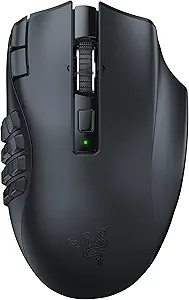 | Best Overall Wireless with Extensive Customization | Number of Buttons: 19 programmable buttons | Battery Life: Up to 400 hours on Bluetooth, 250 hours on HyperSpeed Wireless | Wireless Technology: Razer HyperSpeed 2.4 GHz, Bluetooth | VIEW ON AMAZON | See Our Full Breakdown |
| Logitech G502 Hero Wired Gaming Mouse – Black |  | Best for Precision and Simplicity in Wired Design | Sensor: HERO 16K Optical | DPI Range: 200-16,000 DPI | Programmable Buttons: 11 | VIEW ON AMAZON | See Our Full Breakdown |
| Turtle Beach Command Series MC3 Wired Customizable RGB Gaming Mouse |  | Best for Max Customization and Control | DPI: 30,000 | Sensor: Owl-Eye | Programmable functions: Up to 29 | VIEW ON AMAZON | See Our Full Breakdown |
| Razer Naga Trinity Gaming Mouse with 16,000 DPI Optical Sensor and RGB Lighting |  | Best Modular Design for Versatile Button Layouts | DPI: 16,000 | Button configurations: 2, 7, 12 | Programmable buttons: Up to 19 | VIEW ON AMAZON | See Our Full Breakdown |
| Redragon MMO Gaming Mouse with 12400 DPI, 19 Macro Buttons, RGB Lighting, and Adjustable Weights |  | Best Budget Option with Extensive Macro Support | DPI: 12400 | Buttons: 19 macro buttons | Weight Tuning: Up to 8 removable 2.4g weights | VIEW ON AMAZON | See Our Full Breakdown |
| UtechSmart Venus Pro Wired MMO Gaming Mouse – 16400 DPI RGB |  | Best Overall for MMO Players Who Demand Precision and Customization | DPI: 16400 | Polling Rate: 1000 Hz | Acceleration: 30G | VIEW ON AMAZON | See Our Full Breakdown |
| Razer Naga V3 Pro Wireless MMO Gaming Mouse with Swappable Side Plates |  | Best for Versatile Gaming and Productivity with Swappable Buttons | Connectivity: Wireless (Razer HyperSpeed, Bluetooth) and USB-C wired | DPI: Up to 50,000 | Sensor: Razer Focus Pro 50K Optical Sensor | VIEW ON AMAZON | See Our Full Breakdown |
| Logitech G305 Lightspeed Wireless Gaming Mouse – Black |  | Best for Portability and Wireless Gaming on a Budget | Sensor: HERO optical | DPI: 12,000 | Wireless Technology: Lightspeed | VIEW ON AMAZON | See Our Full Breakdown |
| Acer Wired Gaming Mouse, 12,800 DPI RGB Ergonomic Computer Mouse for PC |  | Best for Right-Handed Users Seeking Ergonomics and Customization | DPI: 12800 | Additional Features: 4 personalized DPI, RGB, macros | Button Quantity: 8 | VIEW ON AMAZON | See Our Full Breakdown |
| Logitech G502 Proteus Core Tunable Gaming Mouse |  | Best for Customization and Dynamic DPI Shifting | DPI: 200-12,000 | Weights: 5 x 3.6g weights | Programmable Buttons: 11 | VIEW ON AMAZON | See Our Full Breakdown |
| gaming mice with customizable button | DPI | Sensor |
|---|---|---|
| Razer Basilisk V3 Customizable | — | Focus Plus 26K DPI optical sensor |
| Corsair Scimitar RGB Elite Wir | 18,000 | PixArt PMW3391 |
| Razer Basilisk V3 X HyperSpeed | — | Razer 5G Advanced 18K Optical |
| Redragon M908 Wired MMO RGB Ga | 12400 | Pixart PAW3327 |
| ASUS ROG Spatha X Wireless Gam | 19,000 | — |
| Razer Naga V2 HyperSpeed Wirel | — | Focus Pro 30K optical sensor |
| Logitech G502 Hero Wired Gamin | — | HERO 16K Optical |
| Turtle Beach Command Series MC | 30,000 | Owl-Eye |
| Razer Naga Trinity Gaming Mous | 16,000 | — |
| Redragon MMO Gaming Mouse with | 12400 | — |
| UtechSmart Venus Pro Wired MMO | 16400 | Avago |
| Razer Naga V3 Pro Wireless MMO | Up to 50,000 | Razer Focus Pro 50K Optical Sensor |
| Logitech G305 Lightspeed Wirel | 12,000 | HERO optical |
| Acer Wired Gaming Mouse | 12800 | — |
| Logitech G502 Proteus Core Tun | 200-12,000 | — |
More Details on Our Top Picks
Razer Basilisk V3 Customizable RGB Wired Ergonomic Gaming Mouse, Black
The Razer Basilisk V3 stands out as the best choice for gamers who want a highly customizable and ergonomic wired mouse. Its 11 programmable buttons and RGB lighting offer extensive personalization, while the Focus Plus 26K DPI sensor delivers precise tracking that surpasses the 18K sensor in the Basilisk V3 X. The optical switches and hyperscroll wheel enhance responsiveness, making it ideal for competitive play. However, the wired connection limits mobility, and the complex setup may be overwhelming for casual users. Despite its premium price, this mouse balances performance and customization for serious gamers who prefer wired reliability.
Pros:- Extensive customization with 11 programmable buttons and RGB lighting
- High-precision 26K DPI optical sensor for accurate tracking
- Ergonomic design with thumb rest for comfortable long sessions
- Responsive optical switches for fast inputs
Cons:- Wired connection may restrict movement during intense gameplay
- Complex software setup can be daunting for beginners
- Premium price may be prohibitive for casual gamers
Best for: Competitive gamers seeking a wired mouse with maximum customization and ergonomic comfort.
Not ideal for: Players who prefer wireless freedom or have a tighter budget, as the premium cost and wired setup may be limiting.
- Number of Programmable Buttons:11
- Lighting:RGB with 16.8 million colors
- Sensor:Focus Plus 26K DPI optical sensor
- Switch Type:Optical switches Gen 2
- Scroll Wheel:Hyperscroll tilt wheel
- Connectivity:Wired
Our verdict“This mouse is perfect for dedicated gamers who prioritize customization, ergonomics, and wired reliability over mobility or budget.”
Corsair Scimitar RGB Elite Wired MMO MOBA PC Gaming Mouse – Black
The Corsair Scimitar RGB Elite is tailored for MMO and MOBA players with its 17 programmable buttons and 18,000 DPI sensor, offering a level of customization that surpasses the Redragon M908’s 18 buttons but with a more streamlined user experience. Its adjustable key slider system allows for personalized button placement, and durable Omron switches ensure longevity. While the wired connection provides reliable performance, the extensive button layout can be overwhelming for casual gamers or those new to customization. Compared to the Redragon M908, it offers more refined ergonomics and easier button management, but at a higher price point.
Pros:- 17 programmable buttons for deep customization
- Precise tracking with 18,000 DPI sensor
- Durable Omron switches with 50 million clicks
- Adjustable button slider for ergonomic flexibility
Cons:- Wired connection limits freedom of movement
- Button configuration can be complex for beginners
Best for: Hardcore MMO and MOBA gamers who need extensive button customization and precise control.
Not ideal for: Casual players or those who prefer simpler setups, as the configuration complexity might be intimidating.
- Number of Programmable Buttons:17
- DPI:18,000
- Sensor:PixArt PMW3391
- Switch Rating:50 million clicks
- Cable Type:Braided
Our verdict“This mouse is ideal for players who want maximum control and customization in a wired format but may be too complex for casual use.”
Razer Basilisk V3 X HyperSpeed Wireless Gaming Mouse, Black
The Razer Basilisk V3 X offers a compelling wireless option with 9 customizable controls and an 18K optical sensor, making it suitable for players who value mobility without sacrificing precision. It provides Razer HyperSpeed Wireless and Bluetooth connectivity, with a battery life up to 285 hours, far exceeding the 67 hours of the ASUS Spatha X. While it doesn’t match the 11 buttons of the Basilisk V3 wired model, its wireless convenience and long battery life cater well to gamers on the move. Compared to the ASUS Spatha X, it sacrifices some button count but gains in portability and simplicity.
Pros:- Wireless connectivity with long battery life up to 285 hours
- High-precision 18K optical sensor
- Ergonomic design with 9 customizable buttons
- Supports multiple connection types for versatility
Cons:- Limited to 9 customizable controls compared to wired counterparts
- Battery life can vary with usage intensity
Best for: Gamers who prioritize wireless freedom and long battery life for extended sessions.
Not ideal for: Players who want extensive button customization or prefer wired mice for responsiveness, as the control count is lower.
- Connectivity:Razer HyperSpeed Wireless, Bluetooth
- Battery Life:Up to 285 hours (Wireless)
- Sensor:Razer 5G Advanced 18K Optical
- Number of Controls:9 customizable buttons
- Lighting:Razer Chroma RGB with 16.8 million colors
Our verdict“This mouse is best for wireless-focused gamers seeking reliable performance and extended use, though it offers fewer buttons than wired models.”
Redragon M908 Wired MMO RGB Gaming Mouse 12400 DPI Remapping Keys
The Redragon M908 caters to gamers who need extensive control, with 18 programmable buttons and a high DPI of 12400. Its adjustable weights and RGB backlighting make it versatile for intense gaming and daily tasks. Compared with the Corsair Scimitar, it offers similar button counts but with more aggressive styling and a broader DPI range, although its setup can be complex for casual users. The high number of profiles and adjustable weights make it a strong choice for power users, but the wired connection and aggressive design might not appeal to everyone.
Pros:- 18 programmable buttons for comprehensive control
- High-precision 12400 DPI sensor
- Adjustable weights for personalized feel
- Multiple profiles for different games
Cons:- Complex setup process can be daunting
- Wired connection limits mobility
Best for: Advanced gamers who want maximum customization and are comfortable with complex setups.
Not ideal for: Casual or beginner gamers, as the extensive options and setup could be overwhelming.
- DPI:12400
- DPI levels:5 (500/1000/2000/3000/6200)
- Polling rate:1000 Hz
- Sensor:Pixart PAW3327
- Programmable buttons:18
- Backlight:RGB, 16.8 million colors
Our verdict“This mouse is suited for experienced gamers demanding maximum customization, though its complexity may challenge newcomers.”
The ASUS ROG Spatha X excels as a premium wireless choice for MMO and MOBA players with its 12 programmable buttons and 19K DPI sensor. Its dual-mode connectivity offers flexibility, while the 67-hour battery life supports marathon gaming sessions. The hot-swappable switches and magnetic charging dock add to its convenience, making it a sophisticated option compared to the simpler Basilisk V3 X. Its weight of 168g and complex customization options might be too heavy or overwhelming for casual gamers, but for dedicated MMO/MOBA enthusiasts, it provides tailored control and extended playtime.
Pros:- High-precision 19,000 DPI sensor for accurate tracking
- Long battery life up to 67 hours with fast charging
- Dual-mode wireless and wired connectivity
- Hot-swappable switches for customization
Cons:- Relatively heavy for some players
- Premium price and complex setup may be daunting for beginners
Best for: Serious MMO or MOBA players seeking a feature-rich wireless mouse with long battery life and customizable switches.
Not ideal for: Casual gamers or those sensitive to weight, as the 168g weight and extensive features might be excessive.
- Connectivity:Dual-Mode (Wired/2.4GHz Wireless)
- Buttons:12 Programmable Buttons
- Weight:168g
- DPI:19,000
- Battery Life:Up to 67 hours
- Additional Features:Hot-Swappable Switches, RGB Lighting
Our verdict“This mouse suits dedicated MMO/MOBA gamers who want premium wireless performance with extensive customization, at the expense of weight and complexity.”
Razer Naga V2 HyperSpeed Wireless MMO Gaming Mouse, 400 Hr Battery, Black
The Razer Naga V2 HyperSpeed stands out for its incredible battery life—up to 400 hours on Bluetooth—making it ideal for marathon gaming sessions without interruptions. Its 19 programmable buttons and high-precision Focus Pro 30K optical sensor offer unmatched control and accuracy, especially compared to wired options like the Logitech G502 Hero, which lacks wireless convenience. The complex setup and bulkier design, however, might not suit every hand or preference for simplicity. This mouse is perfect for dedicated MMO players who value extensive customization and wireless freedom but may be less appealing to those seeking a lightweight or straightforward device.
Pros:- Extremely long battery life reduces need for frequent charging
- High-precision sensor enhances accuracy on various surfaces
- Numerous programmable buttons for deep customization
- Seamless low-latency wireless performance
Cons:- Higher price compared to wired competitors
- Setup can be complex and software-dependent
- Bulkier design may cause discomfort for smaller hands
Best for: Serious MMO gamers who prioritize long battery life and wireless flexibility
Not ideal for: Casual gamers or those with smaller hands who prefer a lighter, less complex mouse
- Number of Buttons:19 programmable buttons
- Battery Life:Up to 400 hours on Bluetooth, 250 hours on HyperSpeed Wireless
- Wireless Technology:Razer HyperSpeed 2.4 GHz, Bluetooth
- Sensor:Focus Pro 30K optical sensor
- Switches:Mechanical Mouse Switches Gen 2 with gold-plated contacts
Our verdict“This wireless MMO mouse is best suited for dedicated players seeking maximum customization and endurance, despite its price and size.”
Logitech G502 Hero Wired Gaming Mouse – Black
The Logitech G502 Hero is a favorite among gamers who prioritize accuracy and customization in a wired form factor. Its HERO 16K optical sensor delivers up to 16,000 DPI, providing precise control that surpasses the 16,000 DPI of the Razer Naga Trinity, but without the wireless setup. With 11 programmable buttons and adjustable weights, it offers a tailored feel, although the wired connection limits mobility compared to wireless options like the Naga V2. This mouse suits gamers who want dependable, high-precision performance without the complexity or bulk of wireless devices, but casual players might find the extensive features overwhelming.
Pros:- High-precision sensor with up to 16,000 DPI for accurate tracking
- Customizable RGB lighting and programmable buttons
- Adjustable weights for personalized feel
- Reliable wired connection with minimal latency
Cons:- Wired design restricts movement and portability
- Complex customization options may intimidate casual users
- Heavier than some lightweight gaming mice
Best for: Competitive gamers needing precise wired control with easy customization
Not ideal for: Players seeking wireless freedom or ultra-lightweight mice for casual gaming
- Sensor:HERO 16K Optical
- DPI Range:200-16,000 DPI
- Programmable Buttons:11
- Lighting:RGB LIGHTSYNC
- Weights:Up to five 3.6g weights
- Connectivity:Wired
Our verdict“Ideal for competitive players who want a reliable, highly customizable wired mouse with excellent precision.”
Turtle Beach Command Series MC3 Wired Customizable RGB Gaming Mouse
The Turtle Beach MC3 offers unmatched customization with up to 29 programmable functions and a high-precision 30K DPI Owl-Eye sensor. Its Titan Optical switches ensure fast response times, making it a top choice for gamers who need extensive macro controls. Compared to the Redragon MM0, which has fewer programmable buttons, the MC3’s onboard profiles and flexible software make it a versatile option for complex setups. However, its wired design and potentially steep learning curve might deter casual users. This mouse is best for those who demand maximum configurability and precision, even if it requires some software tinkering.
Pros:- Up to 29 programmable functions for deep customization
- Extremely precise 30K DPI Owl-Eye sensor
- Fast, responsive Titan Optical switches
- Multiple onboard profiles for quick switching
Cons:- Wired setup limits movement
- Complex software interface may be intimidating
- Heavier weight due to multiple components
Best for: Power users and professional gamers needing maximum macro capability and accuracy
Not ideal for: Casual players or those who dislike complex software setups
- DPI:30,000
- Sensor:Owl-Eye
- Programmable functions:Up to 29
- Switches:Titan Optical
- Cable:PhantomFlex
- Profiles:Five onboard profiles
Our verdict“This mouse is perfect for advanced users seeking extensive macros and top-tier precision, despite its complexity and wired design.”
Razer Naga Trinity Gaming Mouse with 16,000 DPI Optical Sensor and RGB Lighting
The Razer Naga Trinity excels in adaptability, featuring three interchangeable side plates with 2, 7, or 12 buttons. Its 16,000 DPI optical sensor provides precise tracking, rivaling dedicated high-DPI mice but with added versatility. The extensive programmable buttons and vibrant RGB lighting make it ideal for players who want a customizable experience for different games or roles. Compared to the more specialized Naga V2, the Trinity’s modular design allows for quick reconfiguration but can feel bulky or overly complex for casual players. This mouse is suited for gamers who switch between multiple games or need highly tailored control schemes, yet it may be too elaborate for simple setups.
Pros:- Interchangeable side plates for custom button layouts
- Precise 16,000 DPI optical sensor
- Up to 19 programmable buttons for macros
- Vivid RGB lighting with multiple profiles
Cons:- Can be complex for users unfamiliar with extensive customization
- Relatively high price point
- Bulky design may not suit smaller hands
Best for: Gamers who need flexible button configurations for multiple game types or roles
Not ideal for: Casual gamers or those preferring a straightforward, uncluttered mouse
- DPI:16,000
- Button configurations:2, 7, 12
- Programmable buttons:Up to 19
- Lighting:Chroma RGB with 16.8 million colors
- Scroll wheel:Rubberized, tactile bumps
Our verdict“This modular mouse is best for gamers needing adaptable button layouts and precision, though it requires a willingness to manage its complexity.”
Redragon MMO Gaming Mouse with 12400 DPI, 19 Macro Buttons, RGB Lighting, and Adjustable Weights
The Redragon MMO offers a compelling combination of features at a more accessible price point. Its 12400 DPI sensor provides solid accuracy, while the 19 macro buttons and five onboard profiles cater to complex gaming needs. The adjustable weights allow fine-tuning for comfort and balance, making it a versatile choice for both MMO and daily use. Compared to premium options like the Razer Naga V2, it’s more affordable but sacrifices some sensor precision and build refinement. Heavy due to removable weights, it might not suit players seeking a lightweight mouse. Overall, it strikes a balance between performance and value, ideal for gamers on a budget who still want extensive customization.
Pros:- High sensitivity with up to 12400 DPI
- Numerous macro buttons and customizable profiles
- Adjustable weights for personalized comfort
- RGB lighting with multiple modes
Cons:- Heavier due to removable weights, which could fatigue some users
- Setup may be complex for those unfamiliar with advanced customization
- Wired connection limits mobility
Best for: Budget-conscious gamers who want extensive macro controls and adjustable weight
Not ideal for: Players seeking the lightest possible mouse or those preferring wireless models
- DPI:12400
- Buttons:19 macro buttons
- Weight Tuning:Up to 8 removable 2.4g weights
- Lighting:RGB with 16.8 million color options
- Profiles:5 memory profiles
- Polling Rate:125Hz-1000Hz
Our verdict“This mouse offers excellent value for gamers who want extensive macro capabilities without breaking the bank, despite its weight and wired design.”
UtechSmart Venus Pro Wired MMO Gaming Mouse – 16400 DPI RGB
The UtechSmart Venus Pro stands out for its exceptional DPI range of 16400, making it ideal for players who need precise control across various game types. Its 12 programmable side buttons and multiple profiles enable complex macro setups, surpassing the more straightforward layout of the Logitech G305. The wired connection guarantees stable performance, but this can limit movement flexibility during intense gaming sessions. Its ergonomic design with textured grips offers comfort for long hours, yet the extensive customization options might feel overwhelming for casual gamers who prefer simplicity. This mouse balances high-end features with a price that reflects its professional-grade capabilities, making it a solid choice for dedicated MMO enthusiasts.
Pros:- High DPI up to 16400 for precise sensitivity adjustments
- 12 programmable buttons and multiple profiles
- Ergonomic design with textured grip for extended use
- RGB backlighting with customizable profiles
Cons:- Wired connection limits freedom of movement
- Complex customization can be intimidating for new users
Best for: Hardcore MMO players who need extensive button mapping and precise control.
Not ideal for: Casual gamers or those who prefer wireless convenience and simplicity.
- DPI:16400
- Polling Rate:1000 Hz
- Acceleration:30G
- Number of Side Buttons:12
- RGB Colors:over 16 million
- Cable Length:6 ft
- Sensor:Avago
Our verdict“This mouse is best suited for dedicated MMO players who prioritize customization and precision over wireless convenience.”
Razer Naga V3 Pro Wireless MMO Gaming Mouse with Swappable Side Plates
The Razer Naga V3 Pro excels in offering unparalleled customization through swappable side plates—up to 23 buttons—making it a flexible choice for gamers and creators alike. Its wireless connectivity via Razer HyperSpeed and Bluetooth provides freedom that the wired Venus Pro cannot match, but the setup process can be complex for newcomers. The high-precision Focus Pro 50K sensor ensures accurate tracking, comparable to the wired options, with the added convenience of wireless operation. However, the extensive feature set and higher price point may deter casual users who don’t need so many programmable buttons. This mouse makes sense for those who want maximum control across multiple game genres and tasks without sacrificing wireless freedom.
Pros:- Up to 23 programmable buttons with swappable side plates
- Wireless (Razer HyperSpeed) and Bluetooth options
- High-precision sensor with up to 50,000 DPI
- Long battery life up to 155 hours (wireless)
Cons:- Setup and customization can be overwhelming
- Higher price and feature set may be unnecessary for casual gamers
Best for: Streamers, creators, and gamers who need a highly customizable, wireless mouse for diverse applications.
Not ideal for: Budget-conscious users or those seeking a simple, plug-and-play gaming mouse.
- Connectivity:Wireless (Razer HyperSpeed, Bluetooth) and USB-C wired
- DPI:Up to 50,000
- Sensor:Razer Focus Pro 50K Optical Sensor
- Battery Life:Up to 155 hours
- Button Count:Up to 23
- Scroll Wheel:HyperScroll Tilt Wheel
Our verdict“This mouse is perfect for users who want maximum button versatility and wireless freedom, even if it involves a steeper learning curve and cost.”
Logitech G305 Lightspeed Wireless Gaming Mouse – Black
The Logitech G305 Lightspeed offers a compelling blend of wireless performance and affordability, with a HERO sensor that provides up to 12,000 DPI. It’s lighter than the wired Venus Pro, making it easier to maneuver during quick movements, yet it lacks the extensive programmable buttons found on larger mice like the Razer Naga. Its 1 ms report rate ensures lag-free gameplay, but the absence of customizable profiles or macro keys limits its flexibility for complex setups. Battery life up to 9 months is impressive, but reliance on a single AA battery could be a drawback for some users. Overall, this mouse suits gamers who prioritize wireless convenience at a lower price point, with enough sensitivity for most gaming needs.
Pros:- High-precision HERO sensor with 12,000 DPI
- Fast, lag-free wireless with 1 ms report rate
- Long battery life up to 9 months
- Lightweight design for quick movements
Cons:- Limited customization options
- Requires software for some features like endurance mode
Best for: Gamers who want a reliable, portable wireless mouse for casual or competitive gaming without a steep price.
Not ideal for: Players seeking extensive macro capabilities or a mouse with many programmable buttons.
- Sensor:HERO optical
- DPI:12,000
- Wireless Technology:Lightspeed
- Battery Life:up to 9 months
- Weight:3.4 oz
- Connectivity:Nano receiver
Our verdict“This mouse is ideal for gamers seeking a simple, portable wireless option with solid performance at an accessible price.”
Acer Wired Gaming Mouse, 12,800 DPI RGB Ergonomic Computer Mouse for PC
The Acer Wired Gaming Mouse provides a balanced experience with 12,800 DPI and an ergonomic design tailored for right-handed users. Its 8 programmable buttons and customizable RGB lighting make it versatile for gaming and productivity, though it doesn’t match the extensive button count of the Razer Naga or Venus Pro. The wired connection guarantees low latency, but the size and weight—190 grams—may feel bulky for some users, especially those with smaller hands. Its compatibility with various operating systems adds flexibility, but it lacks wireless options, which could be a dealbreaker for those who prefer cordless setups. This mouse makes a strong case for users wanting a comfortable, customizable wired option without premium features.
Pros:- Ergonomic shape for comfortable use
- Customizable with 8 programmable buttons
- High DPI sensitivity up to 12,800
- RGB lighting for personalization
Cons:- No wireless capability
- Bulky size may be uncomfortable for smaller hands
Best for: Right-handed gamers who want a comfortable, customizable wired mouse for both gaming and work.
Not ideal for: Left-handed users or those wanting wireless freedom and ultra-lightweight design.
- DPI:12800
- Additional Features:4 personalized DPI, RGB, macros
- Button Quantity:8
- Connectivity Technology:USB
- Weight:190 g
- Operating System:Windows, macOS, Linux
Our verdict“This mouse suits right-handed users seeking ergonomic comfort and customization in a wired format.”
Logitech G502 Proteus Core Tunable Gaming Mouse
The Logitech G502 Proteus Core offers a well-rounded approach to gaming with its adjustable weights, surface calibration, and on-the-fly DPI shifting up to 12,000. Its 11 programmable buttons provide enough macro functionality for most users, but it doesn’t reach the extensive button count of the Razer Naga or Venus Pro. The surface tuning feature enhances tracking accuracy on various surfaces, a benefit over simpler mice like the G305. However, its more complex setup and multiple adjustable components can be intimidating for casual gamers seeking plug-and-play simplicity. Still, for those wanting a highly customizable wired mouse with versatile controls, the G502 remains a solid choice.
Pros:- Adjustable weights and balance for personalized feel
- On-the-fly DPI shifting up to 12,000
- Surface calibration for better tracking
- 11 programmable buttons for macros
Cons:- Complex for users who prefer straightforward setups
- Less extensive macro options compared to larger MMO mice
Best for: Players who want a highly customizable mouse with adjustable weights and fast DPI switching.
Not ideal for: Beginners or gamers who prefer minimal setup and fewer features.
- DPI:200-12,000
- Weights:5 x 3.6g weights
- Programmable Buttons:11
- Surface Tuning:Yes
- Hyperfast Scroll Wheel:Yes
Our verdict“This mouse is best suited for gamers who value detailed customization and dynamic DPI control.”

How We Picked
These gaming mice were selected based on a combination of performance, build quality, and the flexibility of customization options. Priority was given to models with reliable software, durable switches, and a variety of programmable buttons that cater to different gaming styles. We also evaluated ergonomic design and wireless versus wired options to cover diverse user preferences. The ranking reflects a balance between value, advanced features, and overall usability, aiming to guide both casual gamers and professionals toward the best fit for their needs.Factors to Consider When Choosing Gaming Mice With Customizable Buttons
Choosing the right gaming mouse with customizable buttons involves considering several key factors beyond just the number of programmable keys. Understanding how these features translate into real-world benefits can help you make a more informed decision that suits your gaming style and setup. Let’s explore what matters most when selecting a gaming mouse with flexible controls.Number of Customizable Buttons
The quantity of programmable buttons varies widely among gaming mice. While some models offer a modest set for essential commands, others feature dozens of buttons suitable for complex macros and quick access to in-game functions. However, more isn’t always better—an excessive number of buttons can make the mouse feel cluttered and reduce ease of use. Consider your game type: MMO players benefit from more buttons, while FPS gamers may prefer fewer, more accessible controls. Finding a balance that matches your gameplay style is key.
Wired vs. Wireless Connectivity
Wireless gaming mice have advanced significantly, offering comparable performance to wired options with the convenience of cord-free use. High-end wireless models typically feature low latency and robust connection stability, but they often come at a higher price and require battery management. Wired mice eliminate latency concerns entirely and are often preferred by competitive gamers for their consistency. Your choice should align with your priorities—whether that’s maximum freedom or absolute performance reliability.
Ergonomics and Grip Style
Comfort during extended gaming sessions depends heavily on ergonomic design. Larger, contoured mice suit palm grip enthusiasts, while smaller or more symmetrical shapes appeal to claw or fingertip grip users. A mouse with customizable buttons should also fit comfortably in your hand, as awkward placement can hinder rapid responses. Always consider the mouse’s size, weight, and shape to ensure it complements your preferred grip style and minimizes fatigue.
Software Customization and Ease of Use
Intuitive software is vital for setting up and managing customizable buttons effectively. Good software allows you to assign macros, create profiles, and customize lighting, often with easy-to-navigate interfaces. Beware of overly complicated or buggy software, which can frustrate users and limit customization potential. Compatibility with your operating system and the availability of profile management across devices are also worth checking, especially for multi-platform setups.
Build Quality and Durability
Gaming mice with customizable buttons undergo frequent button presses, so durability is crucial. Look for models with high-quality switches rated for hundreds of thousands of clicks. The overall build quality, including materials used and the robustness of the cable or wireless components, impacts longevity. A well-made mouse not only lasts longer but also maintains consistent performance, reducing the risk of button failure and ensuring your investment pays off over time.
Frequently Asked Questions
How many customizable buttons do I really need for gaming?
The ideal number of customizable buttons depends on your gaming genre and personal preference. MMO players, for example, often benefit from dozens of programmable keys, while FPS gamers may only need a handful for essential commands. More buttons can provide quick access to macros and complex commands, but they can also clutter the mouse and complicate muscle memory. Consider your typical game setup and choose a mouse that offers enough controls without overwhelming you.
Is wireless gaming mice as reliable as wired ones?
Modern wireless gaming mice often match wired performance in latency and connection stability, especially models designed specifically for gaming. However, some users may still prefer wired mice for their absolute reliability and zero latency, particularly in competitive scenarios. Wireless mice offer greater freedom of movement and less cable clutter, but they require regular charging or battery swaps. Weigh your priorities—if latency is critical, a wired mouse may still hold an edge.
Can I customize buttons and macros easily with gaming mice?
Most gaming mice come with dedicated software that allows you to assign functions, macros, and lighting effects easily. The best software provides profile switching, macro recording, and intuitive interfaces. However, the complexity varies; some programs are more user-friendly than others. Make sure to choose a mouse that offers software compatible with your operating system and that meets your specific customization needs, especially if you rely heavily on macros for gaming or productivity.
Are more expensive gaming mice worth the extra cost?
Higher-priced gaming mice generally offer more features, better build quality, and advanced customization options. If you play competitively or require extensive macros and ergonomic comfort, investing in a premium model can be worthwhile. However, for casual gaming, many mid-range options deliver excellent performance without the hefty price tag. Consider your gaming habits and how much you value premium features before deciding whether to splurge.
What should I prioritize: number of buttons or ergonomic design?
Both aspects are important but should be balanced based on your gaming style. If you need many commands at your fingertips, prioritize a mouse with more customizable buttons. If comfort and long-term usability are your main concerns, focus on ergonomic design. Ideally, choose a model that offers sufficient controls without sacrificing comfort, ensuring you can perform at your best during extended gaming sessions.
Conclusion
For casual gamers or beginners, a mid-range model like the Logitech G502 Hero offers a solid balance of features and comfort. Enthusiasts and MMO players should consider the Corsair Scimitar RGB Elite for its extensive button array and customization. For those seeking the best overall experience, the Razer Basilisk V3 combines performance, durability, and extensive controls in a wired design. Premium users or professionals might lean toward the Razer Naga V3 Pro for its wireless capability and swappable side plates. Ultimately, matching the mouse to your gameplay and ergonomic needs will provide the best results.
As an affiliate, we earn on qualifying purchases.Black Friday Picks

Sony WH-1000XM6 Wireless Noise-Canceling Headphones, Black